Eleven scenes, start to finish.
Every capability of .amx, one short section at a time. Every figure is a live WebGPU scene compiling in your browser as you read, with the declarative source code that drives it beside it.
Actors & keyframes
A scene is a list of actors (types and properties) and keyframes. A keyframe stamp (#1.6s) marks a beat, and assignments interpolate from the previous beat.
box: Rect, size: (240, 240), at: (420, 390), corner_radius: 18,
  fill_gradient: linear(135, {"#f5b942", "#ff8666"})

#1.6s
move box [to: (220, 0), 900ms, ease: ease-in-out, anticipate: 80ms]

#2.9s
box.size = (340, 130) [700ms, ease: ease-out]
box.fill_gradient = linear(135, {"#ece7db", "#b9b3a6"}) [700ms, ease: ease-out]
Timing: sequence, stagger, easing
Choreography blocks compose actions: stagger overlaps verbs on a delay curve, sequence runs them back-to-back, and assignments take named easing curves.
row: Row, anchor: scene.center, gap: 64, align: "center", offset: (0, -40) {
  for color, i in {accent.primary, text.primary, …} {
    square[i]: Rect, size: (120, 120), color: color, corner_radius: 14
  }
}

#0.5s
stagger [120ms] {
  pop-in square[0] [500ms, ease: expo-out]
  … four more …
}

#5s
move drop[0] [to: (0, 105), 900ms, ease: linear]
…
move drop[4] [to: (0, 105), 900ms, ease: bounce]
Motion actions
Common motion verbs are built-in: shift, rotate, scale, and entrance pairs (fade-in, draw-in, reveal-in) gate opacity and geometry.
#1.5s
shift actor [by: (160, 0), 800ms, ease: ease-in-out, anticipate: 90ms]

#2.5s
rotate actor [by: deg(90), 800ms, ease: ease-in-out]

#3.5s
scale actor [by: 1.4, 800ms, ease: ease-in-out]

#4.5s
actor.fill_gradient = linear(135, {"#ff9f0a", "#ff5c5c"}) [600ms]
always orbit — see
§09.
scenes/actions.amx ↗
Morphing
Re-declaring an actor at a later keyframe automatically morphs its vector path using strategies: auto, match (vertex matching), or path_arc trajectory hints.
#2s
circle: Polygon, points: {(85, 0), (85, 35), … sixteen-point square …}, fill_gradient: linear(135, {"#f2efe7", "#b9b3a6"}) [1s, strategy: auto]

#5s
poly: Polygon, points: {(0, -95), (24, -30), … ten-point star …} [1.5s, path_arc: 0.3]
GPU filters & effects
Post-processing effects (Blur, Bloom, ColorGrade, Vignette) run as GPU shader passes inside a Filter scope. Their properties keyframe like any actor.
panel: Filter, anchor: scene.center {
  soft: Blur, radius: 0
  glow: Bloom, intensity: 0, keep: 1.0
  grade: ColorGrade, brightness: 1.0
  vig: Vignette, amount: 0, radius: 0.55, softness: 0.7
  art: Group, anchor: scene.center { …the framed content… }
}

#1.8s
panel.soft.radius = 14 [1.2s, ease: ease-out]
panel.glow.intensity = 1.0 [0.5s, ease: ease-out]
shake/pulse on the chip.
scenes/effects.amx ↗
Glass composites backdrop blur: it copies the finished pixels behind its rect, runs a blur pass, and paints sharp children on top.
card: Glass, at: (640, 360), size: (520, 250), corner_radius: 26 {
  frost: Blur, radius: 0
  surface: Rect, size: (520, 250), corner_radius: 26,
    color: "#ffffff1f", stroke: "#ffffff59", stroke_width: 1.5
  heading: Text, text: "Backdrop blur", font_size: 46
}

#1.8s
frost.radius = 22 [900ms, ease: ease-in-out]
frost.radius ramps to 22, settles back to
4, then climbs to 44 — the blur eats the plate, never the card's
border or its text, because both are children of the scope.
scenes/glass.amx ↗
Light & camera
Atmospheric lighting combines screen-blended radial ramps with live camera moves (camera.zoom, camera.at) and animated dash offsets.
key: Ellipse, size: (760, 760), blend: "screen",
  fill_gradient: radial((0.5, 0.5), 0.5,
    {(0%, "#f5b94233"), (55%, "#f5b9420f"), (100%, "#f5b94200")})

#3.0s
rail.dash_offset = 40 [1s, ease: linear]

#6.0s
camera.zoom = 1.35 [1100ms, ease: expo-out]
camera.at = (-60, 20) [1100ms, ease: expo-out]

badge: Text, text: "06 · LIGHT & CAMERA", camera_follow: false
camera_follow: false
pins an actor outside the camera, so the overlay is the one thing that
stays where it was authored.
scenes/light_camera.amx ↗
Text & math
Typst compiles LaTeX-grade mathematics (Typst), formulas, and syntax-highlighted code blocks (Code) directly into vector glyph actors.
eq1: Typst, text: "$ x(t) = sum_(k) A_k dot sin(2 pi f_k t) $",
  font_size: 30, color: text.primary, anchor: scene.center

code1: Code, code: "def attention(q, k):", language: "python", font_size: 26
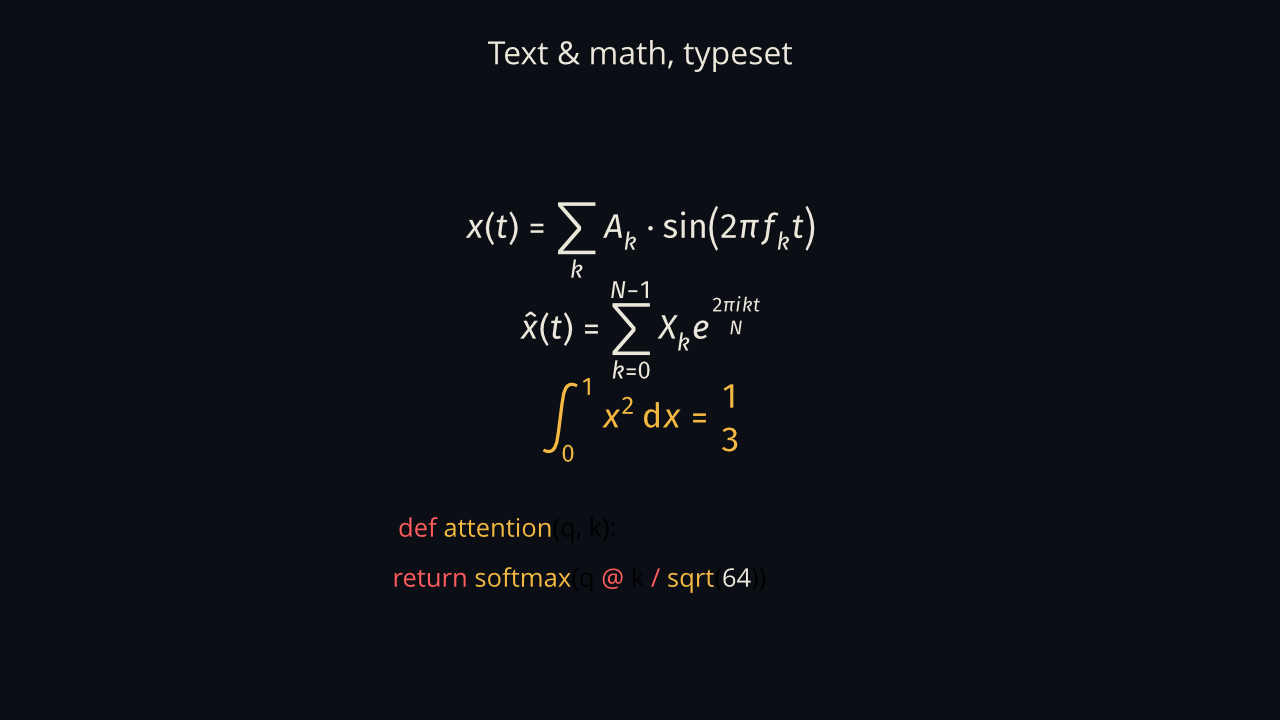
image command —
the same scene plays live on a desktop.
scenes/textmath.amx ↗
Plots & data
Plots are native actors: Graph, PlotCurve (cartesian, polar, parametric), VectorField, and BarChart evaluate directly in data coordinates.
main: Graph, x_domain: (-6, 6), y_domain: (-3, 3), size: (640, 420) {
  sine: PlotCurve, kind: "cartesian", func: (x) => sin(x),
    color: accent.primary, stroke_width: 3, stroke_progress: 0
}

#1.8s
sine.stroke_progress = 1.0 [2.4s, ease: ease-in-out]
stroke_progress; a gradient field fades
in beside it.
scenes/plots.amx ↗
Reactive expressions
Beyond keyframes, an always block evaluates every frame for orbits, physics, and state-machine queries like is_animating() with zero runtime allocations.
always {
  cross_h.at = ring.at
  dot.at = ring.at
  … the other four follow the ring the same way …

  if !is_animating(&ring.at) {
    let p = 0.5 + 0.5 * sin(t * 3)
    ring.stroke = accent.success
    ring.stroke_width = 6.0 - p * 2.4
    ring.size = (220 + p * 18, 220 + p * 18)
    status.text = "IDLE — at rest"
  } else {
    ring.stroke = accent.primary
    ring.size = (220, 220)
    status.text = "TRACKING — keyframe active"
  }
}
Components & modules
pub component creates reusable actors with typed parameters and slot markers, imported across files via import.
import "../lib/components.amx"

row: Row, anchor: scene.center, gap: 28, align: "center" {
  c1: LabeledBox, label: "Query", width: 240, height: 140, text_size: 30
  c2: LabeledBox, label: "Key", width: 200, height: 140, text_size: 30,
    fill: accent.primary, text_color: (0.043, 0.055, 0.078, 1)
  c3: LabeledBox, label: "Value", width: 230, height: 140, text_size: 30
}

#3.2s
shift row [by: (0, -40), 500ms, ease: spring, anticipate: 80ms]
shift.
scenes/components.amx ↗
Scenes, transitions & tooling
Join multiple scenes with GPU transitions (play fade, wipes). Supported by a complete toolchain: formatter, linter, LSP diagnostics, and 4K MP4 export.
play Diagram [fade, 450ms]
// …later…
play Outro [wipe-left, 450ms]
The toolchain
# check a scene for named diagnostics (never-revealed, duplicate-label, …)
animatix check scene.amx

# format, lint, and inspect the timeline the compiler built
animatix fmt scene.amx
animatix lint scene.amx
animatix timeline scene.amx

# export a frame — or a film with the video feature
animatix image scene.amx --time 2.0 -o frame.png
animatix video scene.amx --export-preset 1080p60 -o film.mp4
The full language specification covers everything this tour sketches — types and strict mode, colorschemes, plugin ABI, and the formatter's rules.